Customised AI Automation for Email Marketing: How to Build Bespoke Pipelines That Actually Perform
Most articles on AI email marketing hand you a list of tools and call it a day. This post goes further — showing you how to architect a custom AI automation pipeline, integrate your own data, and measure whether it's genuinely worth the investment.
Why Off-the-Shelf AI Email Tools Fall Short for Serious Marketers
Generic platforms like Mailchimp's AI features or Klaviyo's predictive segments are useful starting points. But they share a fundamental constraint: they're built for the average business, not yours.
If you're operating at scale, sitting on years of proprietary customer data, or running complex multi-product funnels, you'll hit the ceiling quickly. Here's where standard tools fail:
- They train on their own aggregated data, not yours specifically
- Segmentation logic is rigid — you can't define your own behavioural signals
- Personalisation is surface-level (first name, last purchase date)
- No access to proprietary models you may have already built
- Limited feedback loops — the system doesn't learn from your specific outcomes
Customised AI automation for email marketing solves these problems by giving you control over every layer of the stack.
What "Custom AI Email Automation" Actually Means
Custom doesn't mean building GPT from scratch. It means assembling a pipeline where each component is tailored to your business logic.
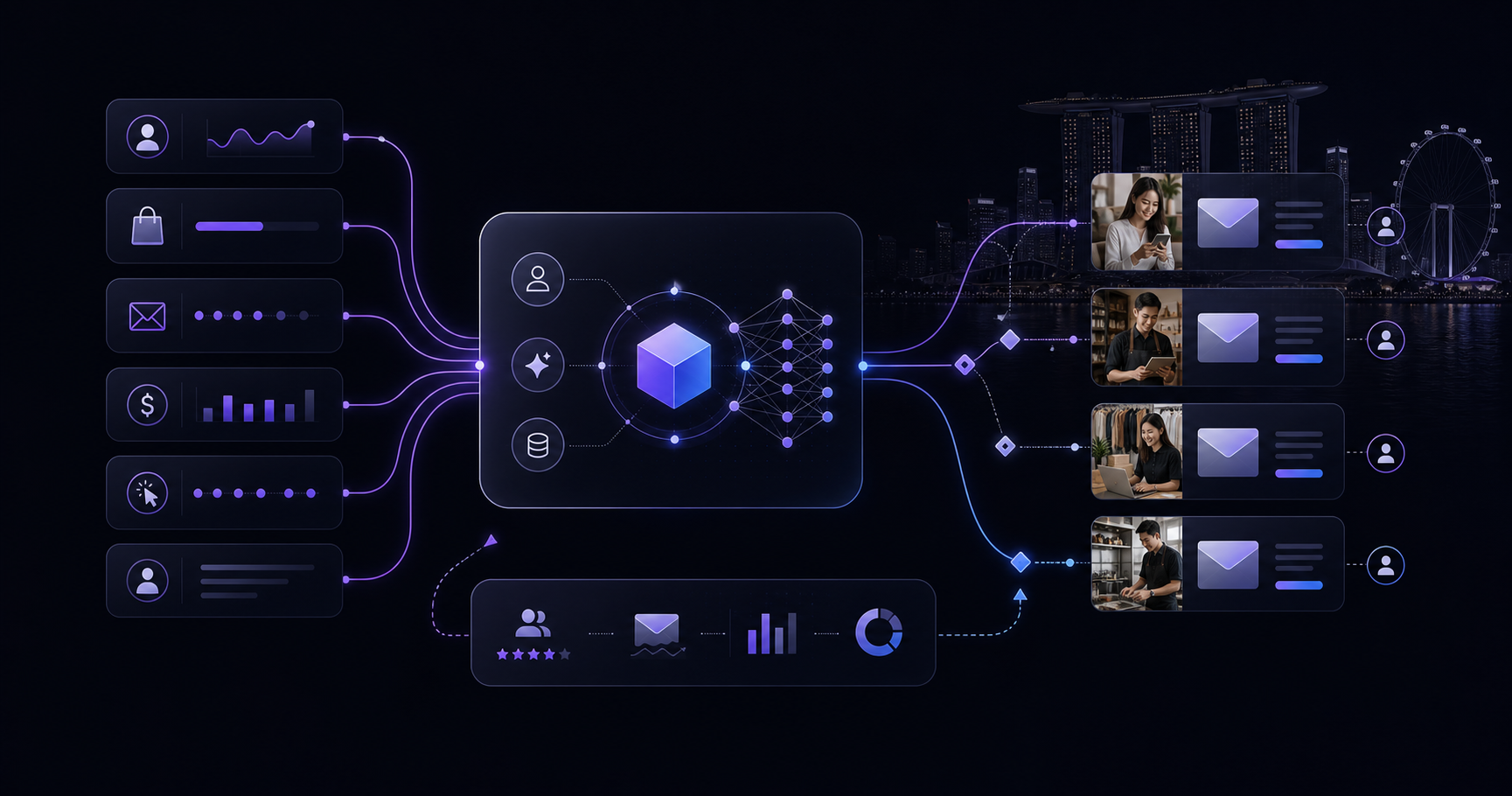
A bespoke AI email pipeline typically includes:
- A data layer — your CRM, behavioural events, purchase history, support tickets
- A segmentation engine — ML models trained on your actual churn and conversion patterns
- A content generation module — fine-tuned or prompt-engineered LLMs producing on-brand copy
- An orchestration layer — workflow logic that decides what gets sent, when, and to whom
- A feedback loop — performance data that retrains or adjusts models over time
Think of it less like a single tool and more like a series of interconnected decision systems.
Workflow Architecture for Specific Business Use Cases
Architecture should follow intent. Here are three common use cases and how the pipeline differs.
Use Case 1: High-Volume E-Commerce Re-Engagement
Goal: Recover lapsed customers who haven't purchased in 60–180 days.
Architecture:
- Pull behavioural data (browse history, cart abandons, email opens) into a feature store
- Train a gradient boosting model to score each customer's re-engagement probability
- Pass high-probability segments to an LLM that generates personalised subject lines and body copy referencing their specific product categories
- Trigger sends via API to your ESP at optimal send times (predicted by a separate open-rate model)
- Feed click and conversion data back into the scoring model weekly
This is fundamentally different from a "we miss you" batch email. Every step is driven by your data.
Use Case 2: B2B Lead Nurture at Different Funnel Stages
Goal: Move MQLs to SQLs through relevant, timely content.
Architecture:
- Integrate CRM deal stage, firmographic data, and content consumption patterns
- Use a classification model to identify intent signals (pricing page visits, competitor comparisons, demo requests)
- Route leads into different nurture tracks dynamically — not based on fixed time delays but on behaviour triggers
- Generate content recommendations using a retrieval-augmented generation (RAG) system trained on your existing content library
- Alert sales reps when email engagement crosses a threshold that predicts call readiness
Use Case 3: SaaS Onboarding and Retention Emails
Goal: Increase feature adoption and reduce churn in the first 90 days.
Architecture:
- Connect product usage events (API calls, feature activations, login frequency) to your email system in real time
- Build a churn risk model that fires different onboarding sequences based on product engagement gaps
- Use LLM-generated microcopy that references exactly which feature the user hasn't activated yet
- A/B test not just subject lines but entire messaging strategies, with automated winner selection
Integrating Proprietary Data and Models
This is the biggest differentiator — and the part most articles skip entirely.
Step 1: Centralise your data Build or use an existing customer data platform (CDP) or data warehouse (Snowflake, BigQuery) as the single source of truth. All AI decisions should draw from the same place.
Step 2: Define your signal library Don't just use what's easy to collect. Define the behavioural signals that actually predict the outcome you care about. This requires analysis of historical data before you build anything.
Step 3: Train or fine-tune models on your data For segmentation and scoring: use your own labelled data (who churned, who converted, who upgraded). For content generation: fine-tune a base model like GPT-4o or use structured prompt templates that enforce your brand voice, tone rules, and product knowledge.
Step 4: Build an integration layer Use tools like n8n, Zapier (for lighter workloads), Prefect, or Airflow to orchestrate data flows between your warehouse, models, and ESP. Your custom logic lives here.
Step 5: Version and monitor everything Treat your models like code. Track model versions, monitor for drift, and set alerts when performance degrades. Email performance is a strong proxy for model health.
Custom vs Off-the-Shelf: The Real Cost-Benefit
The honest answer: off-the-shelf wins for businesses under a certain threshold.
| Factor | Off-the-Shelf | Custom Pipeline |
|---|---|---|
| Setup time | Days to weeks | Weeks to months |
| Upfront cost | Low (subscription) | High (dev + infrastructure) |
| Ongoing cost | Scales with contacts | Scales with compute |
| Data control | Limited | Full |
| Personalisation depth | Moderate | Deep |
| Competitive advantage | Low (everyone uses same tools) | High |
| Best for | <50K contacts, limited data | 100K+ contacts, rich data, complex funnels |
The break-even point typically comes when your email list exceeds ~100,000 active subscribers, or when generic personalisation is provably costing you revenue (testable with a proper holdout experiment).
Measuring ROI on Customised AI Email Automation
ROI measurement is where most projects go wrong. People optimise for open rates when they should be optimising for downstream revenue impact.
The right measurement framework:
- Set a baseline before any AI changes go live — revenue per email sent, conversion rate by segment, churn rate in the 90-day window
- Run proper holdout groups — not just A/B tests but a control group that receives no AI-driven emails, so you can measure true lift
- Attribute correctly — last-click attribution inflates email's contribution; use data-driven attribution or time-decay models
- Track model-level KPIs separately — segmentation precision, content generation approval rate (if humans review), prediction accuracy vs actual outcomes
- Calculate total cost of ownership — include developer time, infrastructure, model API costs, and ongoing maintenance
A realistic ROI target for a well-built custom pipeline: 15–40% improvement in revenue per email sent within the first 6 months, depending on baseline sophistication.
Where to Start Without Boiling the Ocean
You don't need to build all five pipeline components at once. Prioritise by impact:
- Start with smarter segmentation — even a single well-trained churn or purchase-propensity model will outperform manual rules
- Add AI-assisted content generation — fine-tune subject line generation first; it's high-impact and low-risk
- Build the feedback loop last — this is where the compounding value lives, but it requires the rest of the infrastructure to exist first
Final Thought
Customised AI automation for email marketing isn't a feature you buy — it's an architecture you build. The businesses pulling ahead aren't using better tools; they're using their own data more intelligently than competitors who rely on the same off-the-shelf platforms.
Start with the use case closest to revenue, integrate your proprietary data, and measure ruthlessly. That's the actual playbook.
If you'd like to talk through your situation, book a 30-minute call.